Photo · Video · Voice — one professional production studio

Create with freedom.
Finish with confidence.

MaterialLogix unifies intelligent photo finishing, video production, and voice direction in one Windows studio—with precision editing, placement review, recoverable local projects, and clearly labeled cloud capacity.

Local by default. Cloud processing begins only when you choose it and approve the quoted usage.

Local application · cloud only when chosen

Your computer is the studio.

Open MaterialLogix Studio on Windows, activate your signed license, and render Photo, Video, and Voice work on your own GPU. Online licenses revalidate periodically with a three-day offline grace period. Browser and cloud workflows are optional and clearly labeled.

One download, three workflows

The desktop package includes the Studio interface and local engine bridge. Photo upscaling, video processing, voice rendering, project media, and voice packs remain on the device. A cloud job begins only after you choose the cloud lane and see its usage cost.

Local by defaultNo silent uploads or browser access to personal files
License verifiedSigned-key activation unlocks the plan and clean export allowance
Cloud by consentExecution location, progress, credits, and units stay visible in Jobs & usage

Download the Windows preview packet now. It includes the Studio, local engine bridge, lightweight application runtime, Photo upscaler, and one-step installers for the larger Video and Voice runtimes. This is a portable preview ZIP, not yet a signed installer.

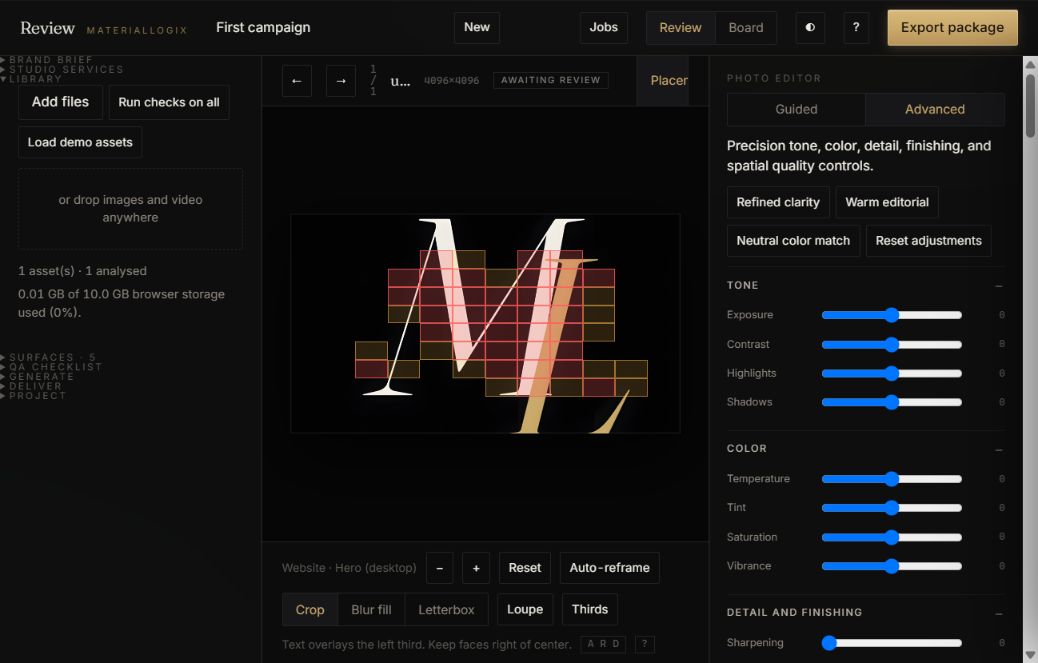
MaterialLogix Review Studio showing campaign direction, project settings, and Jobs and usage
Actual MaterialLogix Review Studio interface · captured from the application
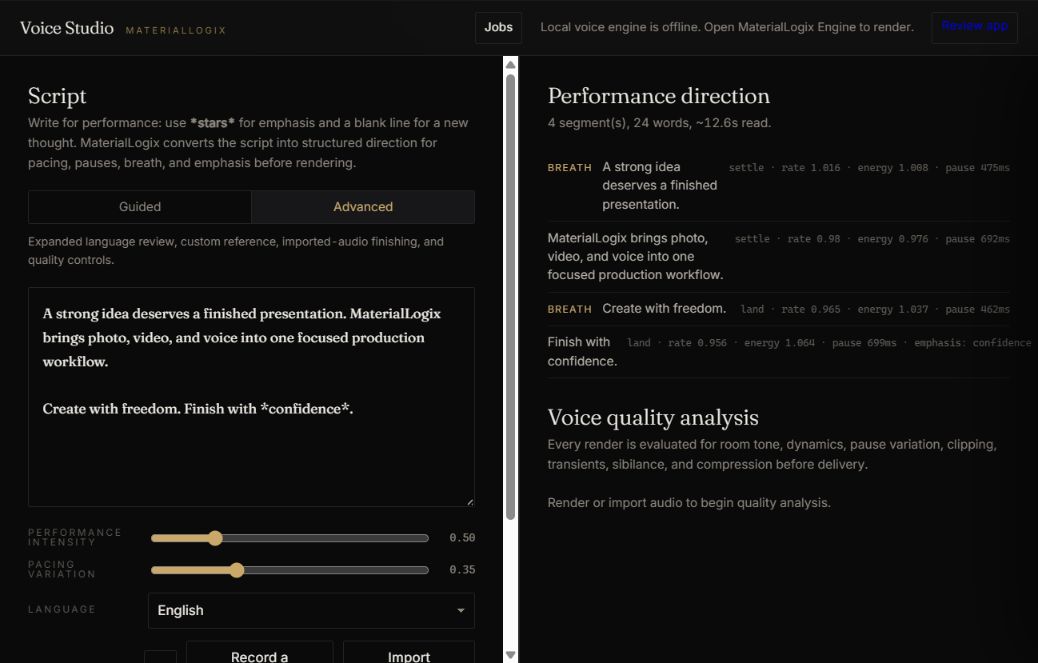
MaterialLogix Voice Studio showing performance direction and voice quality analysis
Actual MaterialLogix Voice Studio interface · captured from the application
Three creative workflows · one studio

Photo, Video, and Voice

Each workflow is useful on its own. Together they share one project system, one local engine, and one quality-control standard from first concept through final delivery.

Flagship

Photo Studio

Import or generate campaign stills and video. Approve per placement — a shot can clear the website hero and fail TikTok in the same pass — then export a package a media buyer can run without a single question.

  • Automated pre-flight: upscale, safe-zones, faces, duplicates of rejected takes
  • Per-placement crops with platform UI overlays
  • 4× upscaling and full video renders on your GPU
  • Client proofs with full-frame watermarks
Complete-package processing

Video Studio

Compile the complete source package once, render locally or send one cloud job, track progress in the Jobs rail, and approve the finished motion asset against every placement where it will run.

  • One compiled cloud package—not a charge per frame
  • Timeline sampling and timestamped review notes
  • Local GPU rendering with CPU fallback
  • Duration rounded once in 10-second blocks
Directed and finished locally

Voice Studio

Turn approved copy into a directed performance. Twelve house profiles, structured pacing and emphasis, local voice finishing, and objective quality analysis guide every take.

  • 12 house directions plus consented voice packs you own
  • GPU rendering with CPU fallback
  • Room tone, breath, dynamics, and sibilance checks
  • Local rendering without a provider fee
Real output from the application

See and hear the local Studio.

These quality-assurance outputs were created by MaterialLogix itself—not substituted marketing generators. The public voice sample ran through local synthesis and voice finishing; the photo proof ran through the local 4× upscaler.

MaterialLogix Voice QA render

Consent first. Proof second.

House voices are performance directions from local open models; personal voice packs require your own or released recordings. MaterialLogix does not scrape public people to imitate them.

DistrictLower-register Middle Atlantic / urban direction
12 profilesRegional, register, pace, and performance choices
Product-madeNo unrelated marketing replacement
Photo proof

4× local upscale output

Image upscaled four times by the local MaterialLogix Real-ESRGAN pipeline

Generated by the bundled Real-ESRGAN workflow during application quality assurance.

Actual MaterialLogix Voice Studio interface
Performance direction, local engine state, voice finishing, quality analysis, and Jobs & usage
Quality control built into the workflow

Confidence before delivery

MaterialLogix combines measurable quality signals with human approval. Delivery-critical failures can block export; assistive indicators direct closer editorial review.

01

Face under the caption

Face detection maps every face against each platform's real UI. A face more than half-buried under TikTok's caption block stops the export.

02

Resolution integrity

A crop that would exceed the approved upscale threshold is stopped with the exact source and delivery dimensions.

03

Rejected-result memory

Perceptual fingerprints help prevent near-duplicates of rejected results from returning to the approval queue.

04

Skin-detail continuity

Regions with unusual losses in fine detail are flagged for magnified review before approval.

05

Loudness compliance

Platforms duck or reject mis-leveled audio. We measure to the broadcast standard and normalize on render.

06

Voice quality analysis

Digital-zero silence, overly uniform dynamics, regular pause timing, clipping, and sibilance are measured before delivery.

07

Identity coverage

360° capture is tracked angle by angle. Missing 40° of someone's left side? You'll know before generation, not after.

08

Alt text & provenance

Approving without accessibility copy is a block. Content credentials are read from the file, never guessed.

Local-first

Your GPU. Your files. Your voice.

Choose local mode to render on hardware you own—the laptop in front of you or an approved machine on your network. In local mode, project media and consented voice references remain on that device. Cloud mode is a separate, explicitly selected workflow for additional capacity: the Studio shows the execution location, uploads one compiled job, quotes the usage, and waits for approval before processing.

0 uploads in local modeproject media stays on the selected device
~15 s4× upscale of a full still, mid-range laptop GPU
No cloud chargelocal processing does not draw from prepaid cloud credit
Three tiers · every term

Pricing

Explore the complete quality workflow with marked previews. Paid plans unlock clean output and commercial production allowances. Choose monthly billing or save with fixed three-, six-, or twelve-month terms.

Free

$0
a complete evaluation workspace
  • Full workflow — review, checks, crops, QA
  • Generate & render previews in-app
  • Proof exports (watermarked, 960px)
  • Voice previews with spoken watermark
  • No cloud credits
Try free in the studio

Complete Lite

$9/mo
essential production capacity · $81/yr
  • All three products, standard quality
  • 100 units a month — video counts 4×
  • 1 voice pack · 3 client links
  • Upgrade any month you need more
Checkout opening soon

Voice Studio

$14/mo
vs. ElevenLabs Creator, $22 for 100 min
  • 500 units a month — an image or a voice-minute is one unit
  • Voice packs, owned outright
  • Voice finishing + quality analysis
  • Optional prepaid cloud voice at $0.25/minute
Checkout opening soon

Review

$32/mo
Topaz: $299/yr for capped upscaling. Here it's unlimited · $288/yr
  • 500 units · unlimited 4× upscaling · 10 cloud-video min/mo
  • Client review links & proof packages
  • Full video renders to platform spec
  • Optional cloud processing with every charge shown first
Checkout opening soon
Best value

Complete

$36/mo
vs. $46 separately · $324/yr — less than Topaz Studio by itself
  • Both products + phone app, one account
  • 1,000 units a month · 20 cloud-video minutes
  • Optional cloud workflow with prepaid, hard-stop billing
  • Priority support
Checkout opening soon

Complete Pro

$59/mo
the commercial lane · $531/yr
  • For businesses and agencies — commercial-use terms
  • 2,500 units · 30 cloud-video minutes · best profiles
  • 25 voice packs · 100 live client links
  • Batch operations, priority everything
Checkout opening soon

Lite: $9/mo · $24/3mo · $46/6mo · $81/yr.   Voice Studio: $14/mo · $38/3mo · $71/6mo · $126/yr.   Review: $32/mo · $86/3mo · $163/6mo · $288/yr.   Complete: $36/mo · $97/3mo · $184/6mo · $324/yr.   Pro: $59/mo · $159/3mo · $301/6mo · $531/yr. License keys carry the term and expire with a 3-day grace.

What meters, and where it stops

Limits per level

Every paid plan includes a monthly production allowance: one image render or one voice minute uses one unit, and one video minute uses four. Local upscaling is unlimited on paid plans and never draws cloud credit. Cloud processing uses a separate prepaid balance with a visible quote and a hard stop at zero.

FreeVoice StudioReviewComplete
Monthly units (image = 1 · voice-minute = 1 · video-minute = 4)5005001,000
Proof exports (image: watermark+960px · video: moving watermark + audible stamps, 720p · voice: spoken stamps ×3)unlimitedunlimitedunlimitedunlimited
Render lanepreview (2× upscale, 60-word stamped voice)standard 4×standard 4×standard 4×
Cloud image upscale$0.10 per image · prepaid · price confirmed before submission
Cloud voice render$0.25 per rendered minute · one compiled job · total duration rounded up once to 10 seconds
Cloud video upscale$3.00 per output minute beyond included plan minutes · one compiled package · $0.50 per 10-second block · five-minute job cap
Voice packs35
Client review links10 live25 live
Pay-per-export (no subscription)+$5 per 100 extra units on any plan · cloud render credits prepaid separately — never auto-billed

Cloud credits start in $10 prepaid packs. MaterialLogix compiles the complete upload into one job; it does not bill individual video frames. The app totals package duration, rounds once to the next 10 seconds, shows and reserves the maximum charge, then settles the delivered job. Balances stop at zero; there is no automatic overage billing.

Questions

Fair questions

What do I install?

Download MaterialLogix Studio for Windows, sign in to activate the device, and add only the engines you use. The browser demo shows the workflow; the installed application performs private local production.

Do my images, video, or voice ever upload to you?

Not in Local mode. Project media, renders, and voice packs remain on your device. Cloud mode is a separate, clearly labeled action: the app shows the execution location and maximum prepaid charge before you confirm the upload.

Do you sell customer data?

No personal information, creative work, prompts, media, or account-level records are sold. Account signup offers separate, off-by-default choices for optional technical diagnostics and product research. A third choice can allow only grouped, de-identified trends to appear in market insights that may be sold or licensed. You can decline everything optional and change your choices later.

What about voice cloning — whose voices?

Only voices with consent: your own, or talent who signed a release. The capture flow is built around that rule, and we will not add scraping features. Your voice pack is yours — we never train on it, and it never leaves your machine unless you send a cloud job.

Can I use my phone?

Yes. Add the companion interface from the browser to your home screen, then use it for capture, review, approvals, and comments while the authorized Windows application handles local GPU work on the same network.

How big is the download?

The current portable Windows packet is about 55 MB and includes the local application runtime plus Photo upscaling. The complete Video runtime is approximately 700 MB because it includes FFmpeg, transcription, a speech model, and motion interpolation. The Voice runtime and model weights require several GB. Video and Voice install only when you choose those capabilities.

What happens when I hit a limit?

The Studio pauses the billable action and explains the available next step. Production units and cloud credit never continue past a cap silently. Paid plans retain unlimited local upscaling even when the monthly production allowance has been used.